Know when your site is down. And why.
Uptime monitoring that checks your sites and cron jobs as often as every 30 seconds on Team, confirms a failure from a second location, and writes down what went wrong.
- Frankfurt
- Stockholm
- Ohio
 Slack
Slack Telegram
- Webhook
 Discord
 Microsoft Teams
14:02 UTC, a Tuesday
It went down.
One location saw a 502. Thirty seconds later a second one confirmed it. Only then did the alert go out, with the evidence attached.
- 14:02:11 one location gets a 502
- 14:02:41 a second location confirms it
- 14:02:43 the alert reaches you
Solo and Team wait for the second location; a free workspace alerts from its one location.

14:03 UTC, one minute later
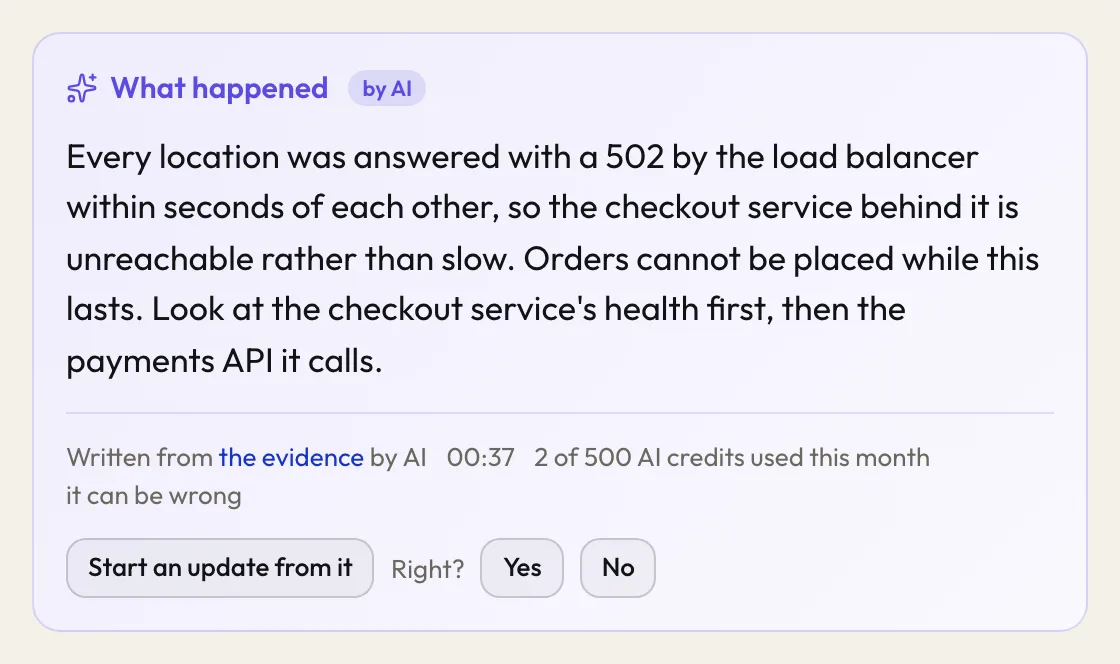
Here is why.
Every incident gets a written reason: what failed, what the checks saw, what to look at first. It never changes a state or reaches a visitor on its own.
14:03 UTC, your words, your domain
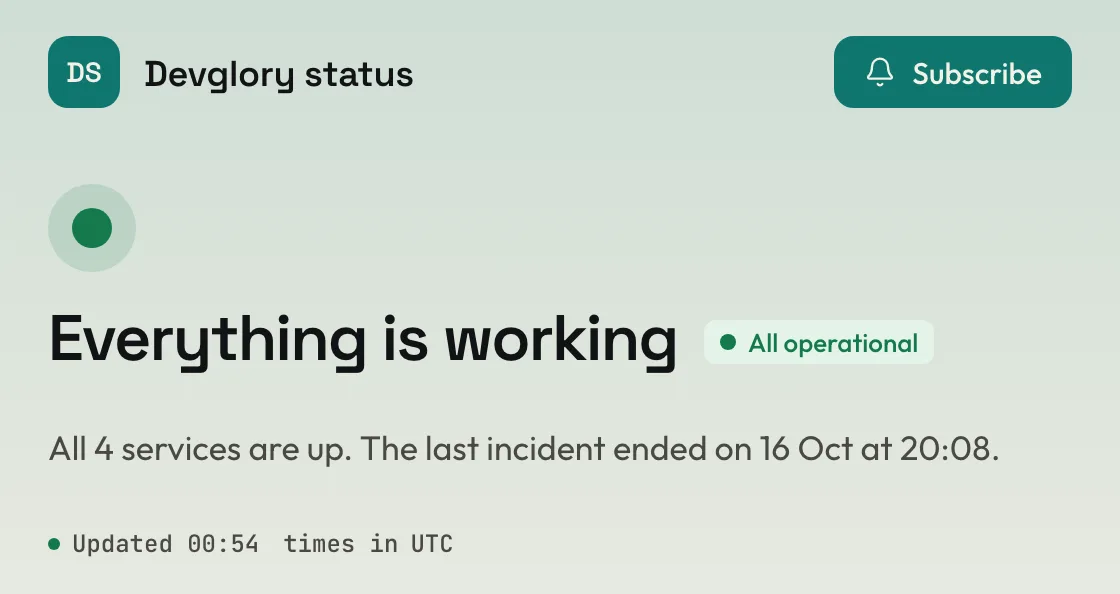
Your customers read this.
A status page on your own domain. You write the note; it is public the moment you save it and stays as history. Nobody has to email you to ask.
14:12 UTC, after it passed
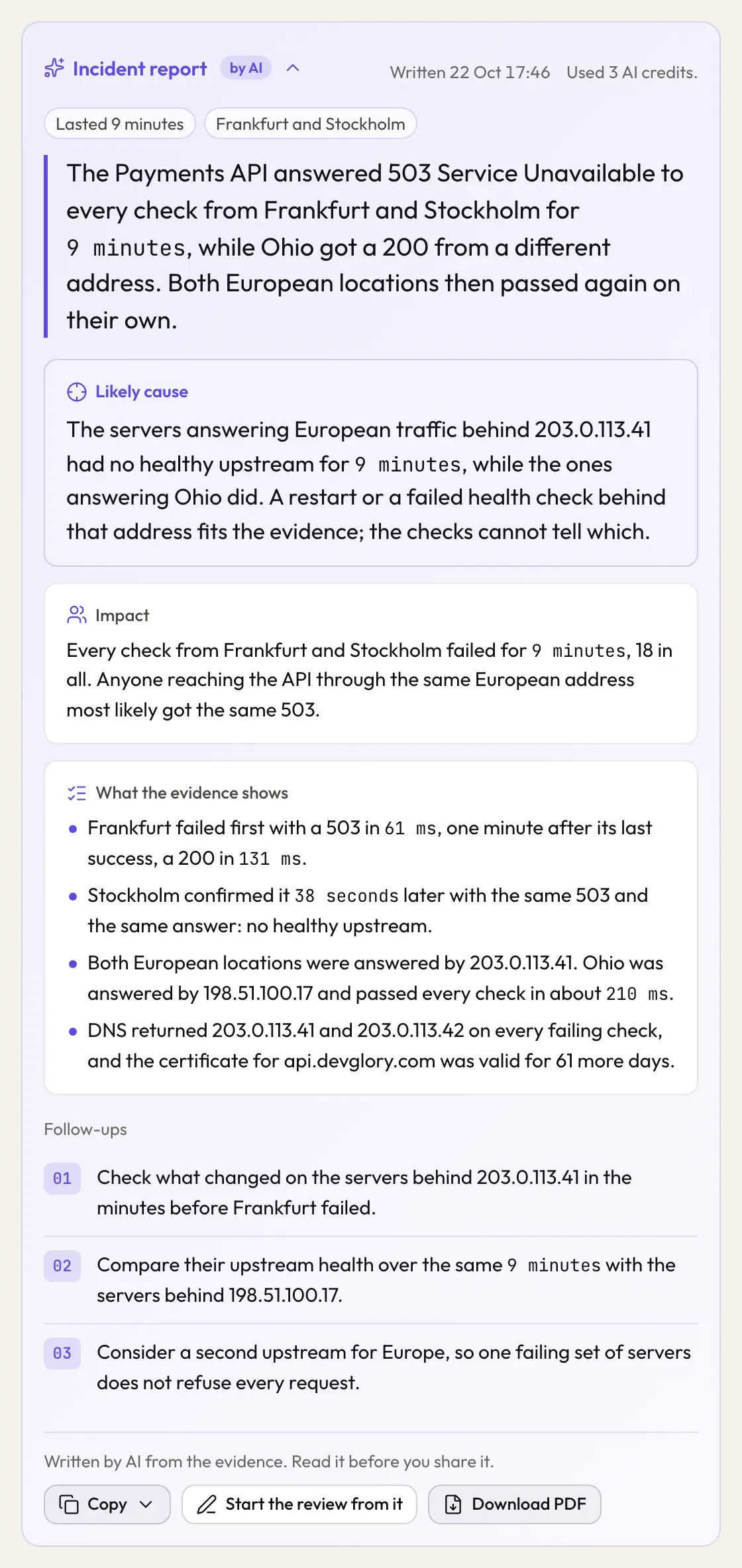
From the alert to the write-up.
When the incident is over, the same evidence becomes the record you keep and the one you send.
- Investigate every check from every location, in order
- Write the report summary, cause and follow-ups, 3 AI credits
- Download the PDF the incident on paper, free
Also 03:00, for a job that went quiet
One line in your cron job.
Add a curl to the end of the job. If the ping is late, the alert says which job, how late, and when it last ran.
# every night at 3, then tell Upglory it finished
0 3 * * *  /opt/backup/pg-dump.sh \
&& curl -fsS https://ping.upglory.io/abc123Four things, one place.
Each one works on its own. Together they answer the three questions an outage raises: is it down, why, and what do we tell people.
Uptime checks
HTTP checks as often as every 30 seconds on Team, with an optional keyword and certificate tracking, confirmed from a second location.
Cron heartbeats
A period, a grace window, one curl line. Start and fail pings tell you how long the job ran.
Status pages
Your domain, your logo, your groups. The incident note is public the moment you save it.
Explanations
A written reason for every incident, from the evidence the checks kept. Marked as written by AI, never sent on its own.
WORKS WITH YOUR TOOLS
Plug it into what you already run.
A REST API, an MCP server for AI assistants, signed webhooks and import from the tool you use now. On every plan.
you  is anything down right now?
assistant  api.example.com is down since 09:12 from every
           location. The explanation says the certificate
           expired at 09:00. Want me to post an update?
REST API Read monitors and incidents, pause and resume, acknowledge, post updates and plan maintenance from your own scripts.
curl -H "Authorization: Bearer $KEY" \
  https://api.upglory.io/v1/monitors
Webhooks One signed JSON event when an incident opens, repeats, is acknowledged or recovers. Import Bring your monitors from UptimeRobot, Pingdom, Better Stack or Checkly. Read the preview first.
Where it checks from, and where alerts go.
Each monitor picks its locations, and each alert goes to the channels you choose. Every location is open on every plan.
- Frankfurt Germany
- Stockholm Sweden
- Ohio United States
- Email live
- Slack live
- Telegram live
- Webhook live
- Discord live
- Microsoft Teams live
No per-monitor pricing. No per-seat pricing.
Free has no time limit. Unlimited members on every plan. Yearly is two months free.
Free
- 20 monitors, 20 heartbeats
- 5-minute checks, 1 location, chosen by you
- 10 AI credits a month
- 1 status page · 90 days of history
Solo
or 150 EUR a year, two months free
- 50 monitors, 100 heartbeats
- 1-minute checks, up to 2 locations, chosen by you
- 100 AI credits a month
- 5 status pages, your domain · 1 year
Team
or 490 EUR a year, two months free
- 150 monitors, 500 heartbeats
- 30-second checks, up to 2 locations, chosen by you
- 500 AI credits a month
- 50 status pages, no footer credit · 2 years
More comes with every plan.
These are on Free, Solo and Team alike. Only the counts differ.
Teams
Unlimited members on every plan, each an owner or a member. Adding a person is never a billing event.
Export before deletion
Deleting a workspace or an account offers you an export of what it holds first.
What we keepPasskeys and no password
Sign in with a code sent to your email, with a passkey, or with GitHub or Google.
Subscribers and feeds
Visitors to a status page can subscribe by email: 100 on Free, 1,000 on Solo and 10,000 on Team. Each page also has RSS and Atom feeds and a JSON status file.
Status pagesMaintenance windows
Schedule maintenance ahead of time. The status page shows it as maintenance, and subscribers hear about it before it starts.
Status pagesAlert channels
Email, Slack, Telegram, Webhook, Discord and Microsoft Teams are live today.
Before you start.
What counts as a monitor?
One address checked on an interval. A cron heartbeat counts separately, with its own limit.
What happens when it says down?
A monitor is down only when a second location confirms the failure; a free workspace alerts from its one location, after two failures in a row. Then the alert goes out, once, with the evidence attached, and again when it recovers.
Can the explanation be wrong?
Yes, and it says so. It is written from the evidence the checks kept, it is marked as written by AI, and it never changes a state or reaches your visitors on its own.
Why is there no password?
You sign in with a code sent to your email, with a passkey, or with GitHub or Google. There is nothing to leak and nothing to reset.
What happens when the AI credits run out?
The incident says so where the written reason would be. Monitoring, incidents and alerts carry on as before. A written explanation uses 1 AI credit and an incident report 3. A pack of 500 AI credits is 20 EUR, paid once, and never expires.
Can alerts go to a webhook?
Yes. A webhook channel posts a signed JSON event to your https address when an incident opens, repeats, is acknowledged and recovers. Alerts reach you by email, Slack, Telegram, webhooks, Discord and Microsoft Teams today.